Chrome extension
Live on ChromeResearch the person on the page — without leaving it.
A quiet chip appears next to a person's name. Click it, and a sourced pre-meeting briefing streams in beside the page. Now on the Chrome Web Store — free.
See it in action
Real briefs, streaming beside the people you already work with — now in Gmail and Google Calendar too.
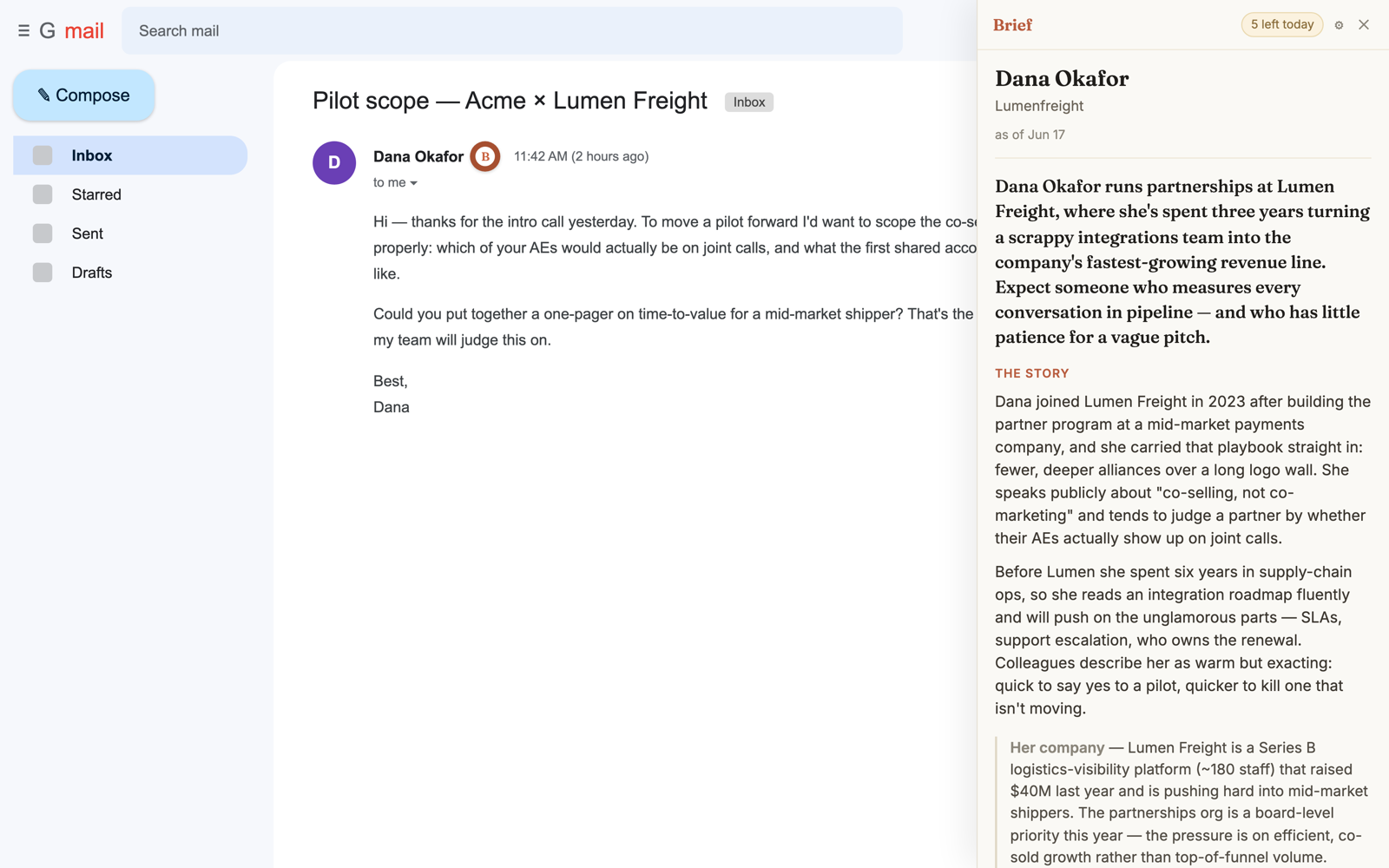
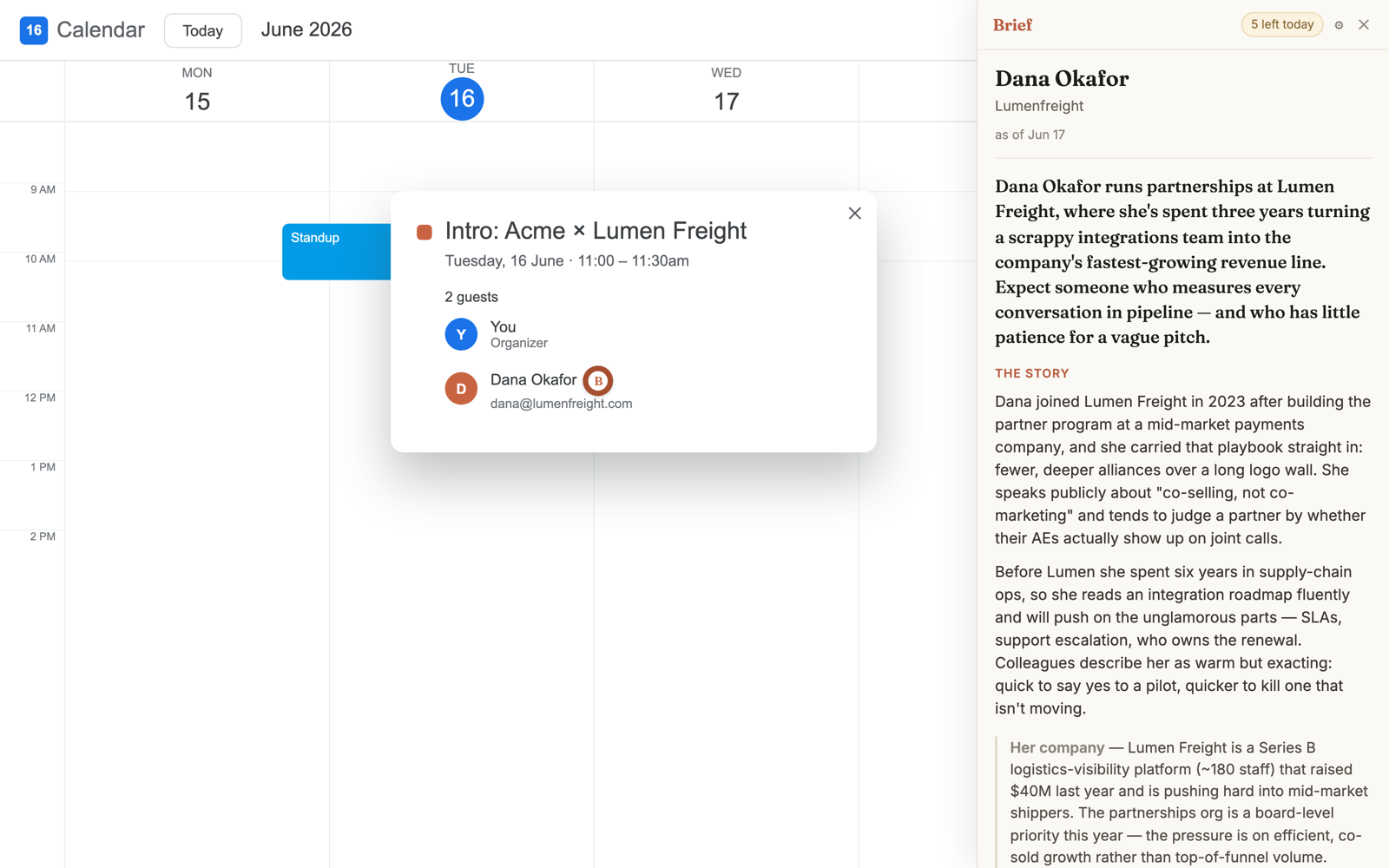
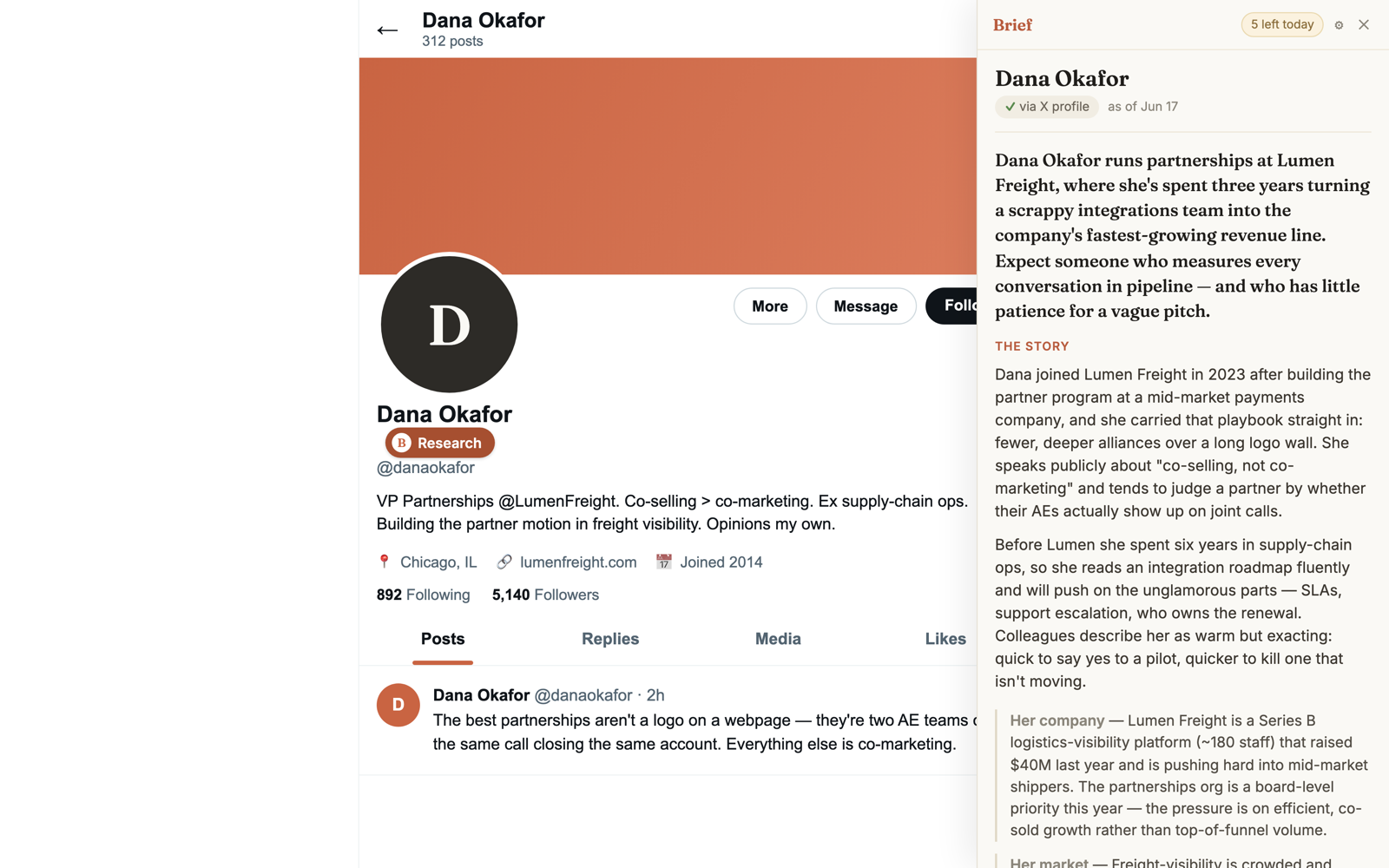
What it is
The Brief Chrome extension is Brief moved to where the person already is. When someone appears on what you're reading, a small chip appears beside their name. One click, and Brief researches them across the live web and streams the brief into a panel next to the page: who they are, what they've recently said and done, three conversation openers, and a source for every claim.
Nothing runs until you click. Every brief is researched live, at the moment you ask — no stale database.
How it works on any website
1.The chip finds the person
It reads only the page you’re on — locally — and offers a chip when a person is its subject.
2.You click — research starts
Your click sends the name plus the page’s context to the live-web pipeline behind briefthecall.com.
3.The brief streams in beside the page
Handshake first, then the dossier, three evidence-backed openers, what to avoid — every claim linked to its source.
4.Ask follow-ups without leaving
Same product as the web app: follow-up questions, your seller lens applied, a link to the full brief.
Where it works
LinkedIn & X profiles
The chip sits beside the name, with the company read straight from the headline.
Articles & team pagesPlanned
Anywhere a person is the subject — a story quoting a CEO, a leadership page.
Gmail & Google Calendar
A quiet chip beside an external sender in your inbox, and every external guest on a calendar invite. Optional — switch each on yourself.
Use cases
The same six jobs Brief does on the web, minus the detour.
Sales calls
Five minutes before discovery, click the chip on the prospect's profile: recent posts, company motion, three openers.
Brief for sales calls →Candidate screens
The candidate's public talks, writing, and company context without leaving LinkedIn — prep, never a background check.
Brief for candidate screens →QBRs & renewals
A new VP inherited your account? Brief them and open the QBR on their agenda, not your slide deck.
Brief for qbrs & renewals →Client meetings
Brief a prospect from the page where you found them — background for the conversation, never an eligibility decision.
Brief for client meetings →Investor pitches
Portfolio themes, stated thesis, recent checks from their profile — pitch the story they're already looking for.
Brief for investor pitches →Interviews
Brief your interviewer: what to naturally bring up — and what's public-but-awkward, flagged so you don't.
Brief for interviews →Privacy & data
- Reads only the page you’re viewing
- Only to detect a name and company. No browsing history, no other tabs, no scraping behind logins, never acting as you.
- Nothing is sent until you click
- The research runs on Brief's servers against the public web — the same source-cited pipeline as briefthecall.com.
- Same policy, same removal process
- The extension shares briefthecall.com's Privacy Policy and removal process.
Briefs are AI-generated and may be inaccurate; they are conversation prep, not a background check.
Frequently asked questions
What is the Brief Chrome extension?+
The Brief Chrome extension is a browser companion for briefthecall.com. When a person appears on the page you're reading — a LinkedIn profile, a news article, a post — a small chip appears next to their name. Click it and Brief researches them across the live web and streams a structured pre-meeting briefing into a panel beside the page: who they are, what they've recently said and done, three conversation openers, and a source for every claim.
How do I install the extension?+
It is live on the Chrome Web Store — add it to Chrome for free, then sign in once with Google. Open a LinkedIn or X profile, or an article about someone, find the small Brief chip beside their name, and click it. Prefer not to install anything? The same research engine is available at briefthecall.com — type a name and get the identical brief in seconds.
Which websites does it work on?+
LinkedIn and X profiles work out of the box — the chip appears next to the name and the person's company is captured automatically. In Gmail and Google Calendar, an optional chip appears beside an external sender or guest; you switch each on with a one-time permission prompt the first time you open it. On any other page — a news article, an interview, a team page — right-click a name or a profile link and choose "Research with Brief."
Does it run automatically on every page I visit?+
No. The extension never researches anyone on its own. It only reads the page you're viewing to detect that a person is on it; nothing is generated, sent, or stored until you click the chip and ask for a brief.
Is the extension free?+
It follows the same model as Brief on the web: free to try, with a Google sign-in for additional briefs. There is no separate price for the extension.
How is it different from using Brief on the web?+
Same engine, same brief — minus the tab-switching and copy-pasting. Because the extension can see the page, it also captures context a search box can't: the person's company from their LinkedIn headline, the article they were quoted in. That context grounds the research, which matters most for common names.
What data does the extension read or collect?+
It reads only the page you are currently viewing, only to detect a person's name and company. It does not browse your history, read other tabs, scrape content behind logins on your behalf, or post as you. Research runs on Brief's servers against the public web — the same pipeline as briefthecall.com. See the Privacy Policy at briefthecall.com/privacy.
Will it work on Edge, Brave, or Firefox?+
Chrome first. Chromium-based browsers (Edge, Brave, Arc) can typically install Chrome Web Store extensions, so Brief will likely run there too — but Chrome is the only browser we officially support today.
Put a brief beside every name you read.
Add Brief to Chrome free, or try the same research engine on the web — type a name, get the brief in seconds.